
Zap Documentation
Lightning-fast image compression for Windows
Microsoft Defender SmartScreen
Why You Might See a Windows SmartScreen Warning
When you launch Zap for the first time, you may see a modal that says "Windows protected your PC" "Microsoft Defender SmartScreen prevented an unrecognized app from starting. Running this app might put your PC at risk." on your PC during the installation process. We want to assure you up front: this warning is not about the safety or quality of our software.
Windows displays this message whenever an app hasn’t yet built up a long track record with Microsoft’s verification system. To remove these warnings permanently, software developers must obtain a specific code-signing certificate through Microsoft-approved vendors. This process is unfortunately slow, expensive, and often difficult for small businesses, but we’re actively working through it.
These requirements are designed to protect users from malicious software, but in practice they also create a financial barrier that smaller teams like ours must overcome before Windows fully “trusts” a new application.
While we complete this process, you can still install Zap safely:
- Download the installer
- When Windows shows the SmartScreen prompt, click “More info”
- Click “Run anyway” to launch the installer
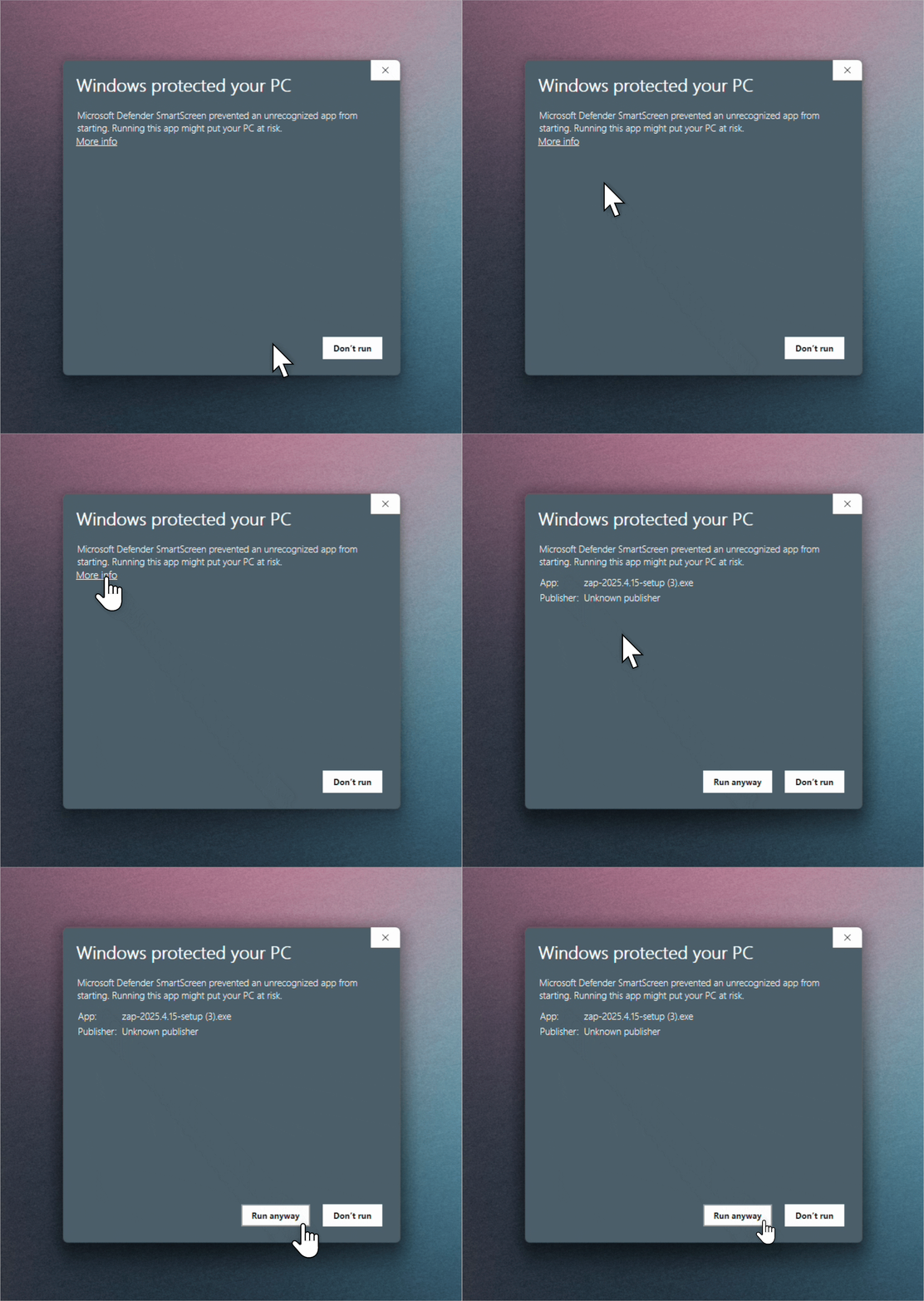
Once you whitelist Zap, you won't see this warning for future updates through the Zap application.
We appreciate your patience while we navigate Microsoft’s certification steps—and we’re committed to making installation smoother in the future